|
|
| Line 2: |
Line 2: |
| | For checking the switch, [[Checking the clutch safety switch|see here]] and [[Understanding/troubleshooting the safety switches|here]]. | | For checking the switch, [[Checking the clutch safety switch|see here]] and [[Understanding/troubleshooting the safety switches|here]]. |
| | | | |
| − | The clutch switch is a simple contact plunger switch. When exposed to dust and the elements, it can get clogged and grimy. If the contacts get clogged up with dust, the clutch switch could feasibly stop working. Most of the time, it just starts making really annoying grinding sounds, and the switch starts offering resistance to the motion of the clutch. Make no mistake, the clutch switch will work even in the worst possible conditions. But it feels so much nicer with a clean switch that works smoothly. | + | The clutch switch is a simple contact plunger switch. When exposed to dust and the elements, it can get clogged and grimy. If the contacts get clogged up with dust, the clutch switch could stop working. Most of the time, it just starts making really annoying grinding sounds and the switch starts offering resistance to the motion of the clutch. But if you get enough guck in the switch, the bike won't start with the clutch pulled in. |
| | | | |
| | First, these two screws hold the switch onto the perch. Remove these to take the switch off. This is common to the EX250, EX500, and the more common ZX-6R parts. These fit on the 46076-1165 perch, and most likely others. | | First, these two screws hold the switch onto the perch. Remove these to take the switch off. This is common to the EX250, EX500, and the more common ZX-6R parts. These fit on the 46076-1165 perch, and most likely others. |
| Line 20: |
Line 20: |
| | [[Image: switch06.jpg|200px]] | | [[Image: switch06.jpg|200px]] |
| | | | |
| − | And here is the housing wide open. The plunger is on a spring on the left. The right hand side has the contact plates. Take the plunger out, and clean off the contact parts. A simple rag with some water will clean everything off quite well. | + | And here is the housing wide open. The plunger is on a spring on the left. The right hand side has the contact plates. |
| | | | |
| | [[Image: switch07.jpg|200px]] | | [[Image: switch07.jpg|200px]] |
| | + | |
| | + | Total parts are: 2 plastic case housings, 1 plunger with electrical wiper, 1 spring for the plunger return, 3 electrical track-style paths for the wiper to contact and the electrical connector. Use a small toothbrush and clean off the grit and grime, then move to a soft wire brush to de-corrode the electrical traces. Finish up with a pencil eraser. After the electrical contacts are clean, apply a small amount of [[Waterproofing your electrical connections|dielectric grease]] to the traces, the wiper, and inside the electrical connector. |
| | | | |
| | Put the plunger back in, and lube the back side of the plunger (the side that contacts the housing) with some synthetic lube. While mostly a placebo, the lube should make the motion of the plunger smoother. The front copper contact should remain clean from the lube. | | Put the plunger back in, and lube the back side of the plunger (the side that contacts the housing) with some synthetic lube. While mostly a placebo, the lube should make the motion of the plunger smoother. The front copper contact should remain clean from the lube. |
| | | | |
| | [[Image: switch08.jpg|200px]] | | [[Image: switch08.jpg|200px]] |
| − |
| |
| − | Then, lube the copper contacts marked here with dielectric grease. This should protect the copper from oxidation. Just dab the contacts lightly. Apply too much grease, and you may insulate the contacts, making the switch useless. A little dab'll do ya'.
| |
| − |
| |
| | [[Image: switch09.jpg|200px]] | | [[Image: switch09.jpg|200px]] |
| | | | |
| − | Putting it back together is just snapping the two halves together, and then screwing the switch back on. That's it. | + | Putting it back together is just snapping the two halves together and then screwing the switch back on. That's it. |
Revision as of 07:18, 19 June 2011
For checking the switch, see here and here.
The clutch switch is a simple contact plunger switch. When exposed to dust and the elements, it can get clogged and grimy. If the contacts get clogged up with dust, the clutch switch could stop working. Most of the time, it just starts making really annoying grinding sounds and the switch starts offering resistance to the motion of the clutch. But if you get enough guck in the switch, the bike won't start with the clutch pulled in.
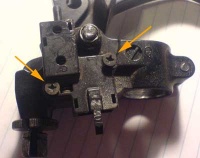
First, these two screws hold the switch onto the perch. Remove these to take the switch off. This is common to the EX250, EX500, and the more common ZX-6R parts. These fit on the 46076-1165 perch, and most likely others.
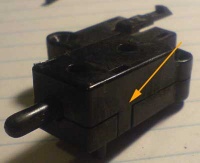
The switch is only held together by the plastic clips on the housing. Here is one on one side.
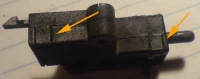
And these two on the other side. These clips lift up by fingernails. A small screwdriver will also do it. Really, this should pose no trouble.
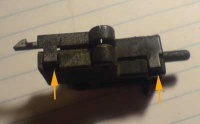
After the clips are pushed up, just lift up the housing.
And here is the housing wide open. The plunger is on a spring on the left. The right hand side has the contact plates.
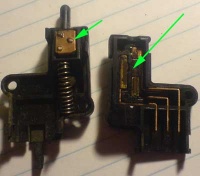
Total parts are: 2 plastic case housings, 1 plunger with electrical wiper, 1 spring for the plunger return, 3 electrical track-style paths for the wiper to contact and the electrical connector. Use a small toothbrush and clean off the grit and grime, then move to a soft wire brush to de-corrode the electrical traces. Finish up with a pencil eraser. After the electrical contacts are clean, apply a small amount of dielectric grease to the traces, the wiper, and inside the electrical connector.
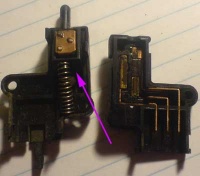
Put the plunger back in, and lube the back side of the plunger (the side that contacts the housing) with some synthetic lube. While mostly a placebo, the lube should make the motion of the plunger smoother. The front copper contact should remain clean from the lube.
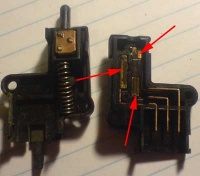
Putting it back together is just snapping the two halves together and then screwing the switch back on. That's it.


